Best IPTV Devices in 2026: Smart TVs, Firestick and Android TV Boxes
Introduction
Are you looking to get the most out of your IPTV subscription this year? One of the biggest misconceptions about IPTV is that you need to purchase expensive, dedicated hardware to enjoy it. In reality, IPTV does not necessarily require purchasing a dedicated device.
Depending on your current setup, you may be able to watch IPTV directly using modern Smart TVs, an Amazon Firestick, Android TV platforms, Android TV boxes, dedicated IPTV boxes, MAG boxes, Formuler devices, mobile devices, and even computers.
Choosing the right device makes the difference between a frustrating, buffering stream and a smooth, cinematic experience. At iScreenHD, we’ve tested our service across hundreds of setups to help you navigate these choices. In this guide, we'll break down everything you need to know about the best IPTV devices in 2026.
Transform Your TV withiScreenHD IPTV
Quick Answer: Which Device Is Best for IPTV?
If you want a straightforward answer, understand that there is no single best device for everyone. Your ideal choice depends entirely on your technical comfort, budget, and existing hardware. Here is a concise comparison of the main categories:
- Smart TV → Best for simplicity. You use one remote and no extra cables.
- Firestick → The most convenient upgrade. It turns any older TV into a modern streaming hub.
- Android TV box → Perfect for flexibility. You get more storage, better processors, and limitless app choices.
- IPTV box → Designed for a dedicated setup. Great if you want a traditional cable-box feel.
- MAG/Formuler → Specialized, IPTV-oriented options where appropriate, offering deep integration for enthusiasts.
What Is an IPTV Device?
Before diving into specific hardware, it is crucial to understand the difference between three distinct elements that make up your viewing experience:
- IPTV service: The provider that supplies the live channels and VODs, such as the premium iScreenHD IPTV service.
- IPTV player/app: The software interface you use to watch the content (e.g., IPTV Smarters, TiviMate). For a deep dive, see our guide on the best IPTV players for 4K streaming.
- Streaming device: The physical hardware that runs the player and connects to your TV and the internet.
A streaming device simply acts as the engine that processes the video data. The more powerful the engine, the smoother the picture.
IPTV on Smart TVs
Modern Smart TVs are incredibly capable machines. Whether you own Samsung Smart TVs (Tizen), LG Smart TVs (webOS), Android TV televisions (Sony, Philips), Google TV televisions (TCL, Hisense), or other compatible Smart TVs, you might already have everything you need.
Advantages:
- No additional hardware: You do not need to buy an extra stick or box.
- Simple setup: Everything is built-in.
- One remote: You control your TV volume and your IPTV app with the same controller.
- Clean entertainment setup: No messy HDMI cables or extra power cords behind the screen.
Limitations:
- App availability heavily depends on the operating system. Samsung and LG have limited, closed app stores.
- Older TVs may have weaker hardware, leading to sluggish menus.
- Application compatibility can vary as TV manufacturers stop updating older models.
Note: iScreenHD offers broad compatibility with major Smart TV brands. Check our devices/compatibility page to see supported models and installation steps.
IPTV on Firestick
The Amazon Firestick remains the undisputed king of budget streaming. For millions of users, it is the perfect middle ground.
Why is the Firestick so popular for IPTV?
- Compact: It hides perfectly behind your TV.
- HDMI connection: Plugs directly into any modern television.
- Simple interface: Easy to navigate, even for beginners.
- Dedicated remote: Comes with voice control and TV power/volume buttons.
- Portability: Easy to move between TVs or take on a trip.
- Great upgrade: It is the best way to make a "dumb" TV smart.
However, performance heavily depends on the Fire TV model. An older Firestick Lite will struggle with 4K streams, while a Firestick 4K Max handles them effortlessly. iScreenHD is fully compatible with Fire OS; read our detailed Firestick setup guide to get started in minutes.
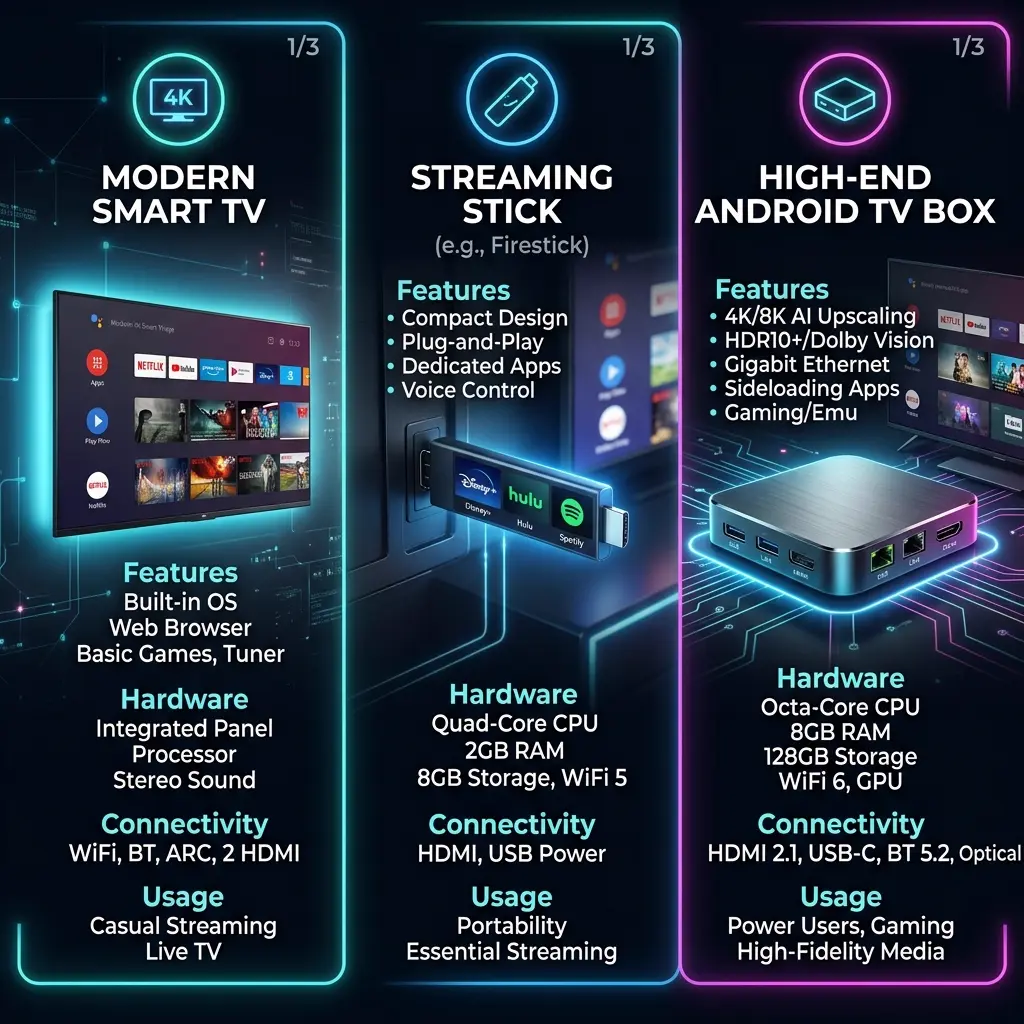 Smart TV vs Firestick vs Android TV box for IPTV
IPTV on Android TV Boxes
If you want maximum control and power, an Android TV box is the way to go. These devices run on Google's Android operating system, giving you access to the Google Play Store and unparalleled application flexibility.
With an Android TV box, you benefit from a wide hardware variety. You can choose a budget box for a guest room or a premium device like the NVIDIA Shield TV for your home theater. Key advantages include:
- Storage: Expandable via USB or MicroSD for apps and recording.
- Performance: Top-tier processors that decode 4K HDR video without breaking a sweat.
- Connectivity: Most include USB ports for peripherals and Ethernet ports for rock-solid internet.
When evaluating these boxes, consider the processor, RAM (aim for at least 2GB, ideally 4GB+), storage, Wi-Fi 6, Ethernet capabilities, true 4K support, and overall software updates.
Warning: Avoid cheap, unknown Android boxes from generic overseas brands. They often provide poor performance, lack proper DRM certification, and never receive software updates. Stick to reputable brands.
IPTV Boxes and Dedicated Streaming Devices
Dedicated IPTV boxes are specialized hardware built almost exclusively for streaming live television. Unlike an Apple TV or Roku, which are built around apps like Netflix or Hulu, an IPTV box is optimized for live channel zapping, EPGs (Electronic Program Guides), and VOD catalogs.
These devices are incredibly useful for users who want an experience identical to a traditional satellite or cable decoder. At iScreen HD, our service works flawlessly across this category. In fact, our platform specifically supports the IPTV Box and MAG Box among our extensive list of compatible categories.
Transform Your TV withiScreenHD IPTV
MAG and Formuler Devices for IPTV
Within the dedicated IPTV box category, MAG and Formuler devices hold a special status.
Why do some IPTV users prefer dedicated IPTV hardware like these?
- Interface considerations: They boot directly into an IPTV portal.
- Remote control: Their remotes feature traditional number pads and colored shortcut keys, perfect for channel surfing.
- IPTV-focused experience: They handle heavy EPG data and channel lists better than generic Android boxes.
For enthusiasts building a premium setup, these are excellent choices. As always, verify compatibility through the iScreenHD installation guide to ensure your specific MAG portal or Formuler MYTVOnline app is supported.
Smart TV vs Firestick vs Android TV Box
To help you decide, here is a clear comparison table:
| Feature | Smart TV | Firestick | Android TV Box |
|---|---|---|---|
| Extra hardware | No | Yes | Yes |
| Setup | Easy | Easy | Moderate |
| Portability | Low | High | Medium |
| App flexibility | Depends on OS | Good | High |
| Performance | Depends on TV | Depends on model | Depends on hardware |
| Upgrade flexibility | Low | Medium | High |
| Best for | Existing Smart TV | Simple upgrade | Flexible users |
8 Things to Check Before Buying an IPTV Device
If you decide to purchase a new device for your IPTV subscription, keep these eight crucial factors in mind:
1. Processor
A fast quad-core processor ensures that heavy menus and massive channel lists load instantly.
2. RAM
Aim for a minimum of 2GB of RAM. Less than that, and your device will freeze when switching between the live TV player and the EPG.
3. Storage
While IPTV is streamed, you still need storage (at least 8GB to 16GB) to install player apps, cache images, and save EPG data.
4. 4K support
Ensure the device officially supports 4K at 60 frames per second (fps).
5. Video decoding
Look for hardware-level decoding for H.265 (HEVC) and AV1. This reduces buffering significantly.
6. Wi-Fi and Ethernet
A device with an Ethernet port is always superior. If relying on wireless, ensure it supports at least Wi-Fi 5 (802.11ac), or ideally Wi-Fi 6.
7. IPTV player compatibility
Make sure the device can run your preferred player. For example, Roku devices are notoriously hostile to third-party IPTV apps.
8. Software updates
Choose a brand that regularly updates its firmware to fix security flaws and improve performance.
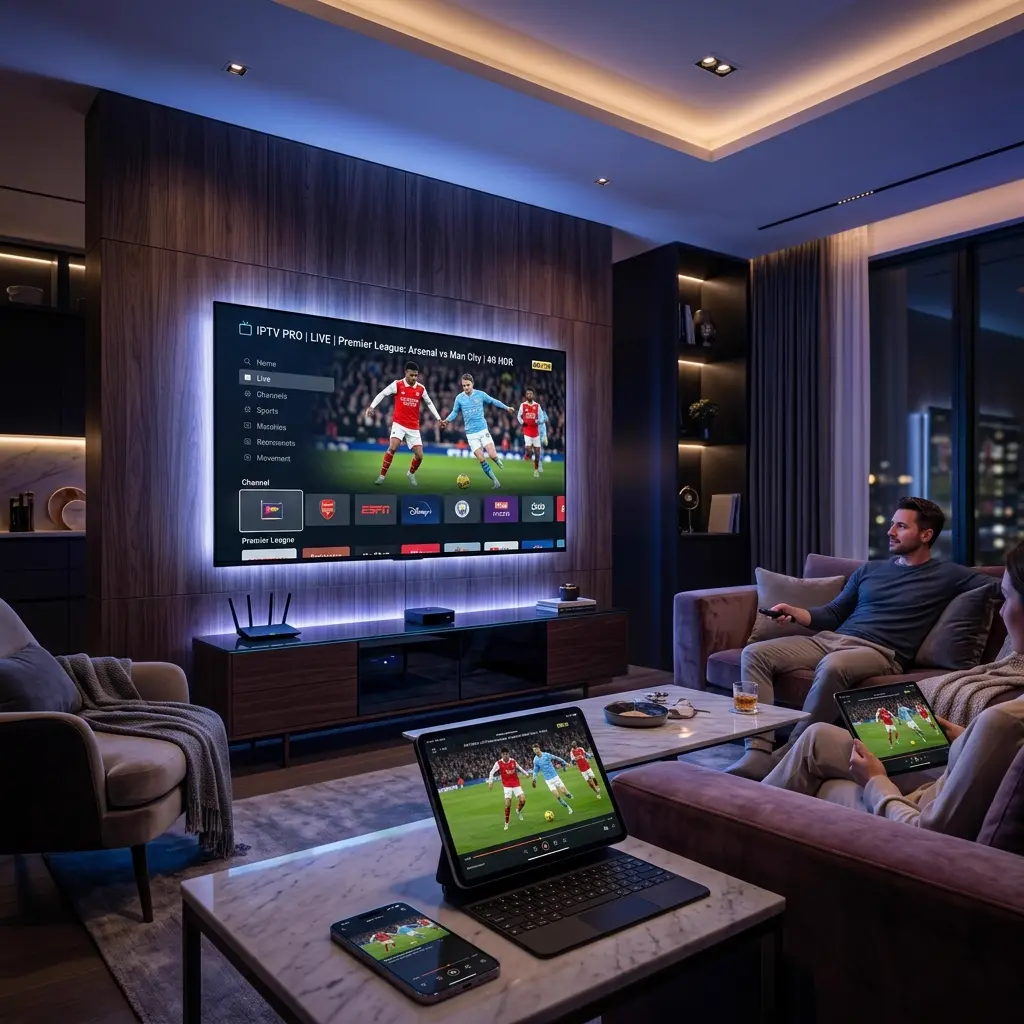 iScreenHD IPTV on compatible streaming devices
What Device Do You Need for 4K IPTV?
We frequently get asked which device is a "true 4K device." However, 4K depends on multiple factors aligning perfectly:
- TV resolution: Your television must be 4K.
- Device capability: The streaming stick/box must output 4K.
- IPTV player: The app must be capable of rendering 4K streams.
- Stream quality: The channel itself must be broadcast in 4K.
- Internet connection: You need the bandwidth to handle the data.
- Network stability: The connection must not fluctuate.
A "4K device" does not automatically make every stream 4K. However, when you use a capable device with iScreenHD's verified 4K/FHD/HD service, the result is breathtaking clarity on major sporting events and blockbuster VODs.
How Internet Speed Affects IPTV Streaming
Even the most expensive NVIDIA Shield will buffer if it is connected to a poor network. Powerful hardware cannot compensate for an unstable internet connection.
Key factors include:
- Download speed: We recommend a stable 25 Mbps for 4K streaming.
- Stability: Spikes and drops cause freezing.
- Wi-Fi quality: Walls and distance degrade wireless signals.
- Network congestion: Too many devices on your network will throttle your stream.
- Router performance: An old router will limit a brand-new device.
- Ethernet: Always use a wired Ethernet connection if possible.
If you are experiencing buffering during major events, it might be your network rather than your device. Read our guide on why World Cup IPTV streams crash and how to prepare for advanced networking tips.
Why IPTV Player Compatibility Matters
Your viewing experience is a triangle: IPTV service + IPTV player + Streaming device.
The relationship between these three dictates everything. There are differences between Smart TV applications (often basic), Firestick applications (abundant but sometimes require sideloading), and Android TV applications (the most diverse ecosystem). IPTV boxes use native portals, while mobile applications and web players offer viewing on the go.
iScreenHD supports a massive variety of player apps across Android, iOS, Windows, and Smart TV operating systems. Finding the right app for your specific device is the final piece of the puzzle. If you are struggling with your program guide loading, for instance, a different app on a different device might solve it—check out our article on IPTV EPG not loading.
Best IPTV Device for Beginners
Beginners usually benefit from simple setup, easy navigation, stable hardware, easy app installation, a reliable remote, and good overall compatibility.
Recommendation: The Amazon Firestick 4K or the Google Chromecast with Google TV. Both plug right into your TV, connect to Wi-Fi easily, and feature a remote that anyone can use intuitively.
Best IPTV Device for Advanced Users
Advanced users who need large playlists, faster navigation, more storage, multiple applications, better connectivity, Ethernet ports, and higher overall performance require more robust hardware.
Recommendation: The NVIDIA Shield TV Pro or a high-end Formuler box. A capable Android TV box or dedicated IPTV device handles 50,000+ channel playlists seamlessly, runs complex VPNs in the background, and decodes heavy 4K streams without overheating.
Do You Need to Buy a New Device for IPTV?
Help yourself avoid unnecessary spending: try using your existing TV first. If your modern Smart TV supports apps like IPTV Smarters or IBO Player, and the menus navigate smoothly, you do not need to buy anything else.
However, an external device may help if you have:
- An older Smart TV that no longer receives updates
- Slow hardware that takes 10 seconds to load a channel
- Limited application support in your TV's native app store
- Poor software support that causes random crashes
- A need for better performance or additional connectivity (like an Ethernet port)
Using iScreenHD on Compatible Devices
At iScreenHD, we have built our infrastructure to be as universal as possible. Our verified compatible devices include a wide range of categories to ensure you can watch however you prefer.
The iScreenHD ecosystem officially supports categories including MAG Box, Android, iOS, IPTV Box, Formuler, Firestick, Smart TVs, Android TV, Apple TV, and Windows.
Whether you are watching a live match on a premium OLED Smart TV or catching up on a series via your Windows laptop during a commute, your iScreenHD subscription travels with you. Check our FAQ for specific setup parameters, or reach out to our Contact/Support team if you need assistance configuring a specific device.
How to Choose the Right IPTV Device
Making a decision doesn't have to be complicated. Use this simple decision guide:
- Modern Smart TV → Try using the existing TV first. It's free and easy.
- Older TV with HDMI → Consider a compatible streaming stick like a Firestick.
- Need flexibility → Consider an Android TV box for the Google Play Store.
- Need dedicated IPTV hardware → Consider an IPTV Box, MAG, or Formuler where compatible.
- Need 4K → Make sure the TV, device, player, network, and stream all support 4K.
Common IPTV Device Buying Mistakes
Avoid these pitfalls when shopping for a new setup:
- Buying only based on price: A $15 no-name Android box will cause nothing but headaches.
- Buying unknown hardware: Stick to brands with a track record.
- Ignoring software updates: Without updates, apps will eventually stop working.
- Ignoring IPTV player compatibility: Ensure the device runs the app you actually want to use.
- Ignoring network quality: Buying an expensive box won't fix bad Wi-Fi.
- Assuming 4K hardware guarantees 4K streams: The stream source must also be 4K.
- Assuming a more expensive device automatically means better IPTV: Sometimes a simple Firestick is exactly what you need.
- Buying a new device when the existing TV is already sufficient: Test your TV first!
Frequently Asked Questions About IPTV Devices
What is the best device for IPTV in 2026?
There is no single "best" device. The NVIDIA Shield TV Pro is widely considered the most powerful, the Firestick 4K Max is the best value, and modern LG/Samsung Smart TVs are the most convenient.
Can I use IPTV directly on my Smart TV?
Yes. Most modern Smart TVs (Samsung, LG, Android TV) have IPTV player apps available in their native app stores, allowing you to use iScreenHD without extra hardware.
Is Firestick good for IPTV?
Absolutely. It is affordable, powerful enough for 4K streaming, and allows you to easily install the most popular IPTV players.
Are Android TV boxes good for IPTV?
Yes, they offer the most flexibility and power, especially high-end models. However, avoid very cheap, unbranded boxes.
Do I need a separate IPTV box?
No. While dedicated IPTV boxes (like MAG or Formuler) offer a great specialized experience, you can easily use a Smart TV, Firestick, or standard Android TV box.
What device is best for 4K IPTV?
Devices with strong processors and hardware decoding for H.265/AV1, such as the Firestick 4K Max, Apple TV 4K, or NVIDIA Shield, paired with a stable 25+ Mbps internet connection.
Does IPTV work on all Smart TVs?
Not all. Very old Smart TVs or those with obscure operating systems may lack compatible apps. In these cases, adding a Firestick or Android TV box is the perfect solution.
Does the IPTV player depend on the device?
Yes. The operating system dictates which apps you can install. Apple TV uses the App Store, Firestick uses Amazon/Android APKs, and Samsung uses the Tizen store.
How much internet speed do I need for IPTV?
For stable viewing, we recommend a minimum of 15 Mbps for HD content and 25-40 Mbps for 4K streams.
Can an old Smart TV run IPTV?
If it has an HDMI port, yes! You simply plug in a streaming device like a Firestick or Android TV box, completely bypassing the old, slow TV software.
Is an Android TV box better than a Firestick?
It depends. Android TV boxes generally offer more storage, USB ports, and Ethernet, making them more powerful. Firesticks are more compact, budget-friendly, and simpler to set up.
Which devices are compatible with iScreenHD?
iScreenHD is compatible with almost everything: Smart TVs, Firestick, Android TV, Apple TV, MAG Box, Formuler, iOS, Windows, and standard IPTV Boxes.
Conclusion
Navigating the world of streaming hardware doesn't have to be overwhelming. Whether you leverage the built-in capabilities of modern Smart TVs, opt for the unmatched convenience of a Firestick, explore the flexibility of Android TV boxes, or invest in dedicated IPTV boxes and MAG/Formuler devices, 2026 offers incredible options for every user.
Remember that your viewing experience is a combination of performance, a rock-solid internet connection, broad player compatibility, and meeting the strict 4K requirements. By avoiding common buying mistakes and evaluating your actual needs, you can build a setup that provides flawless entertainment for years to come.
When you pair the right hardware with a premium service like iScreenHD IPTV, you unlock a universe of limitless sports, movies, and live television. Ready to upgrade your entertainment? Explore our pricing plans today and discover the true potential of your streaming device!